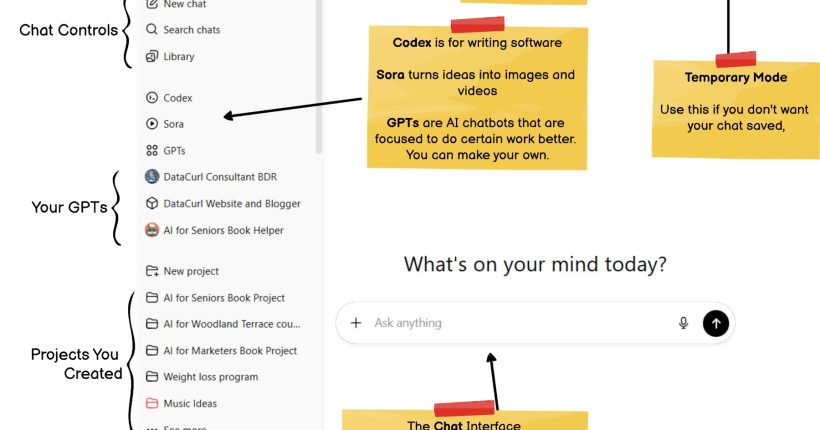

Learning something new is easier when you have a simple place to look up the words. That is what this glossary is for. In How Seniors Learn AI, we use a few terms again and again, like “prompt,” “chat,” and “voice.” Instead of guessing what they mean each time, you can come here and get a short, clear reminder in plain English.
This blog post collects all the glossary words from the book in one spot. Each word has a simple definition, written for real people, not computer experts. You can skim the list, look up a single term when you are stuck, or read a few entries each day to build your confidence.
Glossary Words
.docx: A file type used for documents made with Microsoft Word or other word-processing programs.
.txt: A plain text file that holds only words, with no pictures or special formatting.
Acronym: A short word made from the first letters of a longer name, such as SSA for Social Security Administration.
AI (Artificial Intelligence): Computer programs that try to act smart, like understanding questions and giving helpful answers.
Algorithm: A set of clear steps a computer follows to solve a problem.
App: A program you install and use on a phone, tablet, or computer.
Audience Targeting: Writing so the message fits the people who will read it.
Antivirus: Software that protects your computer from harmful programs.
Bluetooth: A short-range wireless way to connect things like headphones or speakers.
Browser: The program you use to visit websites, such as Chrome or Safari.
Canvas (ChatGPT): An editor view where you can open a section, make changes, and save inside ChatGPT.
Chat: A back-and-forth message thread between you and the AI.
Chat History: The list of your past chats that you can open again later.
Chatbot: A computer helper that talks with you in text or voice.
ChatGPT: A popular chatbot made by OpenAI.
Claude: Another chatbot made by the company Anthropic.
Content Expansion: Asking the AI to take a short idea and make it longer and more detailed.
Data Center: A building full of computers where AI runs and answers your questions.
Deepfake: A video or sound clip changed by AI to make it look or sound real, even when it is not.
Dictate Mode: You speak, and the computer turns your voice into text.
Drafting: Writing the first version of something before editing it.
Export: Saving the AI’s answer as a file you can print or share.
Fact-Checking: Checking whether something you read or hear is true.
Find: A tool that searches for a word or phrase in what you are reading.
Format Switching: Turning the same content into a different shape, like bullets, a letter, or a flyer.
Gemini: Google’s AI chatbot.
Generic Prompt Framework: A fill-in-the-blank style question you can reuse to ask the AI for help on many topics.
Habit Stacking: Linking a new habit to one you already do, like asking AI for your to-do list right after your morning coffee.
Image Generation: When AI creates a new picture or drawing from your written description.
Interface: The screen layout with buttons and boxes you click or tap.
Jargon: Special words used by certain groups, such as doctors or tech people, that can sound confusing.
Link: A piece of text you can click that opens a web page or file.
LLM (Large Language Model): The AI brain that learned patterns from lots of text.
Login: Your account sign-in using a name and password.
Micro-edits: Small fixes to wording, spelling, or clarity.
Microphone Button: The on-screen button you press to talk to the AI.
Model: The main AI program, like its brain, that creates answers.
Narrative Stitching: Combining small stories or memories into one smooth piece of writing.
OpenAI: The company that builds ChatGPT.
Outline: A short plan that lists the order of ideas before you write.
Phishing: A scam message that tries to trick you into clicking a bad link or sharing private information.
Plus Button (+): Lets you add files like photos or documents into a chat.
Pop-up (fake alert): A window that suddenly appears and tries to scare you into clicking “fix now.”
Popup: A small window that appears on top of what you are viewing.
Print-on-Demand: A service that prints books only when someone orders one.
Project Instructions: Notes you keep in a Project so the AI remembers how to help.
Projects: A place in ChatGPT that keeps related chats and files together.
Prompt: The message or question you type to tell the AI what you want.
Prompt Engineer: A person who knows how to write very good prompts to get the best results from AI.
Prompting Skills: The knack for writing clear, detailed questions or instructions for the AI so it gives better answers.
Read Aloud: ChatGPT reads the answer out loud so you can listen.
Recurring Reminder: An automatic alert that repeats on a schedule, like every week.
Restart: Close and reopen something to fix small problems.
Save: Keep a copy so you can find it later.
Scam: A dishonest trick to steal money or personal information, often through email or phone.
Screenshot: A picture of what is on your screen right now.
Share Chat: Create a link so others can view a chat.
Temporary Mode: A chat that disappears after you close it.
Template: A ready-to-fill outline you can reuse for similar messages.
Template (household): A reusable list or layout for chores, shopping, or notes.
Token: A tiny piece of a word the AI uses to read and write text.
Tone (in writing): The feeling of your message, like friendly, serious, or funny.
Training Data: The many examples the AI studied to learn how to answer.
Troubleshooting: A simple process for finding and fixing tech problems.
Voice Matching: Making the writing sound like a specific person.
Voice Mode: You can talk to ChatGPT and hear it talk back.
Wi-Fi: A way to connect to the internet without wires.
WWH Prompt Framework (Who-What-How): A simple way to ask AI good questions, where you say who to act as, what to do, and how to show the answer.
Closing
Think of this glossary as your “safety net” while you learn. You do not need to memorize every word. You only need to remember that help is here when something looks unfamiliar. When a term in the book or in ChatGPT feels confusing, pause for a moment and check it here.
You can bookmark this page, keep it open while you read, or come back whenever you hit a new word. Over time, the terms will start to feel comfortable and ordinary. That is the real goal of How Seniors Learn AI. Not to impress you with fancy language, but to give you simple tools and clear words you can use every day.